Unit 10 - DJ Performance Techniques
DJ Equipment SetupIn this assignment I’m writing about the type of equipment that would be used by a DJ who specialises in blending tracks, beat matching and playing records to an audience to both entertain them and educate them with the continuous flow of music. These DJ’s may use vinyl records, CD’s, MP3’s and serato software and hardware to play their music, and they may infact use more than one of these things incase something brakes, or if they want to play a track they only have in a certain format. I will write about each of these, as well as crucial equipment that goes with it for a DJ to put on a show, and then discuss the features of these pieces of equipment and finally an evaluation of how well certain equipment works in it’s field and compared to its competators.
Vinyl DJ Setup:
A DJ playing vinyl records from their own collection would have to bring all the music they wished to play that night to the venue with them, which may be restricting as they can’t take everything they own due to the size and weight. They would need two turntables, so that while one record is playing they can cue up the next one and move from one record to the other seemlessly. Another piece of equipment needed for this is a mixer, which sits between the two turntables, and contains the neccessary controls to move between turntables, and add effects to the sounds. The other equipment they’d need is a pair of headphones to plug into the mixer, so they can hear the record they’re preparing to play without it being played to the audience. Also they need monitoring equipment so they can hear live sound without any delay or altered sound, and this would come from a booth monitor facing them. It’s important for the DJ to have a reliable reproduction of the live sound, so they know that when they match the beat of the following record to the live sound it will definately be in time and sound right to the audience. Usually the larger equipment like the booth monitor, mixer, turntables and an in house PA system will be provided by the venue, so the DJ would only be responsible for bringing their music and accessories like headphones etc. The equipment provided would be industry standard, so there wouldn’t be any complaints from the DJ, or any problems that would affect the sound quality. An example of industry standard turntables are Technics SL 1210. Important features of this turntable are:
- Direct Drive - The platter of the turntable is rotated by a direct drive motor, which responds to an alteration in speed by a DJ touching the record far quicker than a belt driven turntable would. This is important as when the DJ is finding the point of the record where they want to drop it in, it has to be procise and on beat, so it murges with the previous track properly.
- Counter Weight - This is a weight on the end of the tone arm, which is adjustable and varies the weight of the needle on the record. This can stop the needle bouncing around loosly on the record, which is more useful for a scratch DJ, but still important if the vinyl is a lighter weight, or has lots of music packed onto one side as this can often compromise the depth and width of the grooves making them easier to skip between.
- Pitch/Speed Accuracy - It has a strobe which shines onto a pattern on the side of the platter, which guides you to getting the speed perfectly at 331/3 or 45 rpm, by creating the illusion that the lines on the side of the platter aren’t moving.
Here’s an image of the Technics SL 1210, showing some of it’s key features I descirbed. Many other turntables provide competition for this turntable, and many try to mimic its best features, but this turntable has a reputation as one of the best turntables, and this reputation sets it apart from its competition.
An example of a good mixer for a vinyl DJ is the Pioneer DJM-800. It does everything a mixer has to do,and has a simple layout and all the necessary features of a mixer. The mixer is used by the DJ to move between the two turntables, cue the upcoming track and EQ/Filter effects to the sounds to give their performance a unique edge. The most important features are:
- Cross Fader - A basic fundamental component which allows the DJ to blend subtly between tracks on two turntables, or tracks on two CDJs/Serato time coded vinyl. When the slider is positioned fully left, the mixer is receiving signal from the left turntable only, and when fully right, receiving signal from the right turntable only. When it’s in the middle the output is a 50/50 split of the two decks, and during the performance it would only e there if the beats and tempos of the two tracks were matched and the DJ was transitioning from one to the other.
- Channel Volume - Often with vinyl the volume of the pressing can vary depending on the amount of music one a side, the weight and quality etc. so the channel volume allow you to increase the volume of the signal from a turntable if it fluctuates between records.
- 96KHz/24Bit Sampling - This is a high quality rate to convert the audio signals from the turntables to digital signals where effects and filtering can be added before converting the signals back to analogue to be played out of the PA system. The high conversion rate ensures the sound quality isn’t compromised from the original signal to it being sent at to the speakers. A mixer without this sample rate may produce a lifeless sound, despite having effects added to it.
- Versatility - This mixer has four RCA inputs which correspond to the for channels on the mixer. This mean that equipment with RCA outputs like vinyl turntables and CDJs can be connected to it, and because there’s four channels instead of two, two turntables and two CDJ’s could be connected at the same time. This means the DJ has many options for what they want to play next, and in which format they want to play it.
- Additional Features - This mixer has other features which make the DJ’s life easier, for example the pots which control the digital effects light up which is useful as DJ’s often gig in dark rooms so this means they won’t accidentally add any wrong effects or on the wrong channels as the visibility will be better.
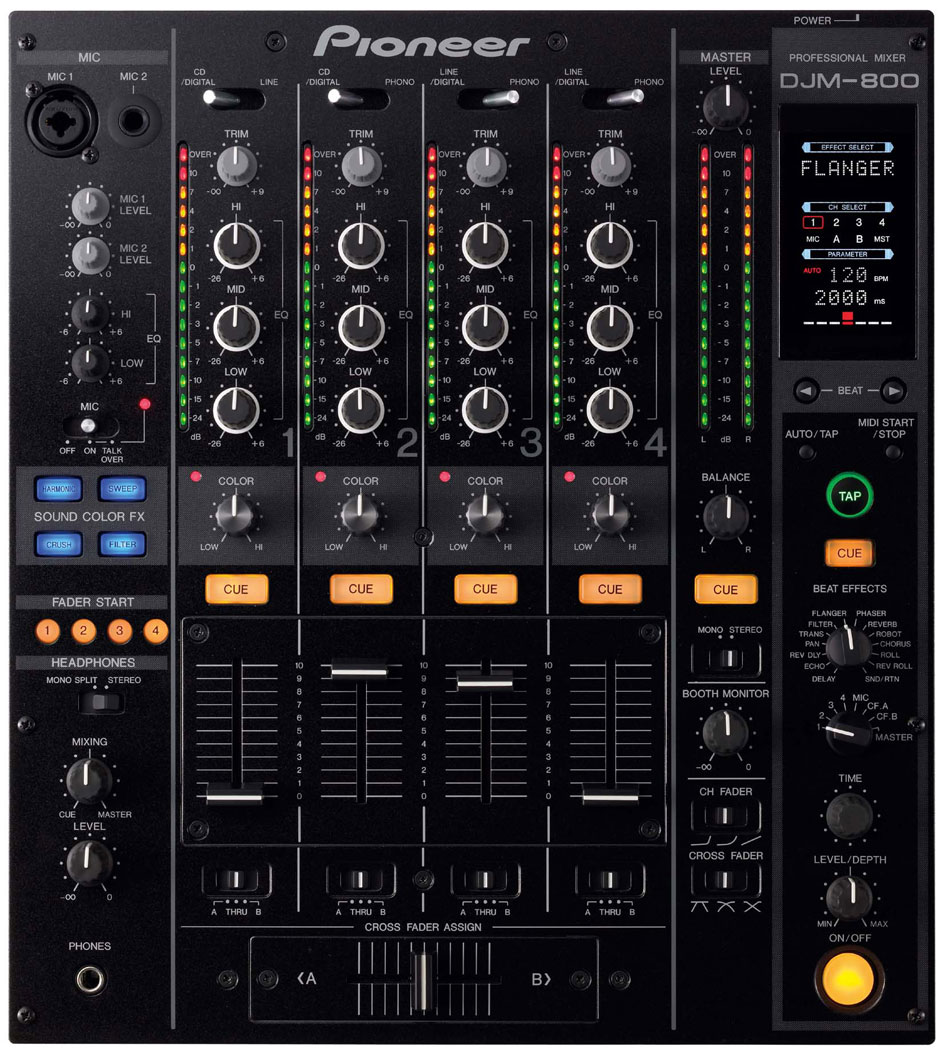
Below is a picture of the back of the mixer which shows its inputs and outputs. In the bottom left there’s a power input for a kettle lead labelled AC/IN, which gives the mixer power. There are 4 RCA inputs, labelled one to four, 2 of which are line/digital for turntables and 2 are CD/digital for CDJs. There’s also one RCA output labelled master which sends all the sound being processed by the mixer to the PA. There’s a L and R jack output labelled booth which is to send the signal to a booth monitor which is what the DJ listens to the blend the cued track in their headphones to. It also has MIDI inputs and outputs for digital hardware and additional equipment they may want to use.

For monitoring it’s important that the DJ can hear live sound, and headphone sound to match the tempo and beat of a track to the live sound, so it sounds right to audience when its introduced and keeps the flow of the set going. Therefore two crucial pieces of kit are a booth monitor and closed back headphones. The headphones would be property of the DJ, and although the DJ may need their own portable booth monitor they will often be provided by the venue. A good example of a portable monitor is a Mackie SRM-350 V2. Good features of this are its size and portability, as although many venues have or hire this equipment, they could be performing in a venue not accustom to live performance, where portability would be crucial. It’s a 2- way bi-amplified monitor which means it has a woofer for low frequencies and a tweeter for high frequencies and each has its own amplification. This means the signal it recieves is split when it arrives, so signals above the frequency level go to the tweeter and those below are sent to the woofer, and then the two are amplified seperately. This means the monitor works more efficiently as power isn’t being wasted giving more power to a tweeter that doesn’t necessarily need it. Another bonus is that electronic crossover is designed to prevent phase problems, so the sound is as clear as possible, and no sounds are cancelled out. These features set it apart from other speakers in the same price range, and at around £300 it is affordable for even smaller DJs to have this good piece of equipment to aid their performance. Here’s a picture of it.

CD/MP3 Setup:
Usually digital music can be performed using similar DJ equipment whether its on CD or an MP3 file, for example a digital mixer will often be compatable with traktor for MP3 as well as having inputs for CDJs, and often CDJs are capable of playing MP3 files giving them many options of what to use. Lots of this equipment derives from the vinyl setup that preceeded it, but because of the music being a digital format, not all vinyl DJ’ing equipment is suitable to use with digital music. The first thing is a CDJ, which is the equivalent of the turntable but plays CDs instead. It differs from a standard CD player as it allows you to control the music with a platter on top of the CDJ, imitating the technique you would use to scratch on vinyl, but in the case of a blend DJ, just to move the needle to find the start of a bar or section. This isn’t in direct contact with the disc which many vinyl DJ’s find they cannot adapt to, but it aims to give the DJ the same control over the CD as they had with a record on a turntable.
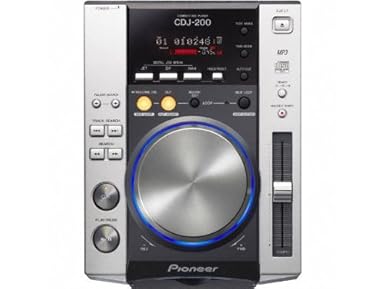
An example of a CDJ is the Pioneer CDJ200, which is a mid-priced CDJ with limited features but allowing you to do the same as with vinyl.
- MP3 & CD playback - This means you can control either the CD in the player or MP3s in the library. All MP3s are laid out in folder view on the screen so they can be found quickly during a live performance. This works in conjunction with on screen information like auto BPM which aids the DJ getting the track in time and making a better blend between tracks.
- Tempo Changing - There’s a tempo guide on the screen and three pitch lock settings on the tempo button which allow you to speed up or slow down your track to match the one that proceeded it, and then keep it at that constant tempo, and to prevent it going in the pitch it would’ve naturally changed to due to the tempo change, which could be out of a certain key and sound odd.
- Jog Wheel - This is what simulates a record platter, and allows you to speed or slow down the track and find a position in the track in a hands on manner, with a similar action to putting your hand on a record and dragging it forward or backward.
- Effects - These may not be important if the mixer has its own in built digital effects, but the CDJ has three effects of its own to play around with and alter the characteristics of the track you’re playing.
An alternative digital sound source is to use Traktor software on laptops to play and manipulate MP3 files. This can be compatable with mixers specifically designed to use traktor, or other digital mixers, but two platters would still be needed to control the tracks, which are on some mixers. Traktor is less limited than a CDJ in what you can do to a track, making for a more creative performance and allowing the DJ more freedom. Also modern digital mixers have lots of built in effects that can be applied to the track in many different ways giving the DJ more creative freedom. An example of a good digital mixer with these features is the Pioneer DJM850, which has four channels, each capable of applying digital effects and EQ to the track, giving the DJ many options.
- Channel Effects & EQ - Each channel has a pot labelled colour, which controls how much of that signal is sent to have effects added to it, and on the right of the mixer there’s a display showing information about the effect being added and pots to change the effect and also it’s level and how much it acts on the sound with a wet/dry control which would work for the reverb setting. Also each channel has a 3 band EQ, which means it can target at three different frequencies which would be a cut or boost of low, mid or high frequencies. This gives the DJ lots of options of how to manipulate the track.
- Versatility - A big selling point of a modern digital mixer would be its versatility, and how many functions it has. This has the ability to be used as a MIDI controller, so pots on the mixer could be used to trigger MIDI data that could control anything from a musical element, to a lighting display, giving the DJ yet more areas to explore to enrich their performance.
- Sampling Rates - Like the vinyl set up mixer it has a 24bit 96KHz sampling rate, which means even if the tracks have effects on them they still are good quality when played out loud.

Pros and cons of CD/MP3 setup:
One massive advantange of using MP3 is that the DJ doesn’t have to take their hole CD or Vinyl collection to a gig, but can have all the songs they want to play on one CDJ or laptop with external memory. Also digital music’s quality can be depleted by excessive playing or contact like vinyl can, so this means the files you have will always be fit to use in a gig.
However, many DJ’s may not like the disconnection of CDJ deck which isn’t in direct contact with the disc you are controlling, whereas with vinyl you are touching the disc itself to find the correct position in the track or match the beat which maybe be a more comfortable and natural feeling. Also there are instances where certain tracks are only released on 12” vinyl and not digitally, so if you desperately wanted to play one of these tracks you’d have to buy the record and play it that way.
Serato Setup:
Serato addresses the pros and cons of vinyl or digital DJ’ing and tries to create the best of both worlds by utilising the advantages of both. It uses pieces of vinyl with time code pressed on it, and this corresponds to digital files on serato software on a laptop, meaning that these MP3s can be controlled by the moving of the vinyl, giving the DJ the comfortable feel of manipulating the timing by touching and dragging the vinyl, but doesn’t wear out as the music is an MP3 file, and means the DJ only has to ever carry two pieces of vinyl. The other piece of equipment needed is a rane box which acts as an interface between the mixer and the laptop and will convert signals between analogue and digital, send the MP3s from the serato software to the decks and then out of the speakers and also is responsible for making sure the MP3 files are responsive to the movement of the vinyl on the platter, which is more important for scratch DJ’ing but still important for mix DJ’s.
The Rane SL4 is the highest specification of Rane interface, which like the mixers mentioned earlier has a 96KHz 48KHz sampling rate to ensure the tracks aren’t losing quality, and it also has USB and Aux inputs and outputs for connectivity to the computer and external things like a live recording for example. This is interchangable with a compatable Rane mixer which would do the job of a mixer and an interface but these would be more expensive. Here’s a picture of the rane.

Here’s a picture of a typical serato setup showing the components needed for it to work. The microphone is optional, but in DJ sets it may be useful to have a microphone to talk to the crowd, or work vocals into the act. This would be connected to the mixer by XLR or Jack.

With serato or the CDJ/MP3 setup, things like booth monitors and speaker equipment are a constant, so I haven’t written about them again, but they’re still very important to the setup.

No comments:
Post a Comment